LCD Display Module vs. Complete Display Assembly: Which Is Right for Your Project?
Choosing a display for an electronic product involves more than selecting a screen size. You also need to consider touch control, electronic connections, installation space, and how the display will work with the rest of the device.
This leads many manufacturers to an important question: should they buy an LCD display module or a complete display assembly?
An LCD display module may suit a company with its own engineering team, while a complete display assembly can help when several parts need to work together.
This guide explains the differences, looks at common configurations, and helps you choose a display solution for your project.
1. What Is an LCD Display Module?
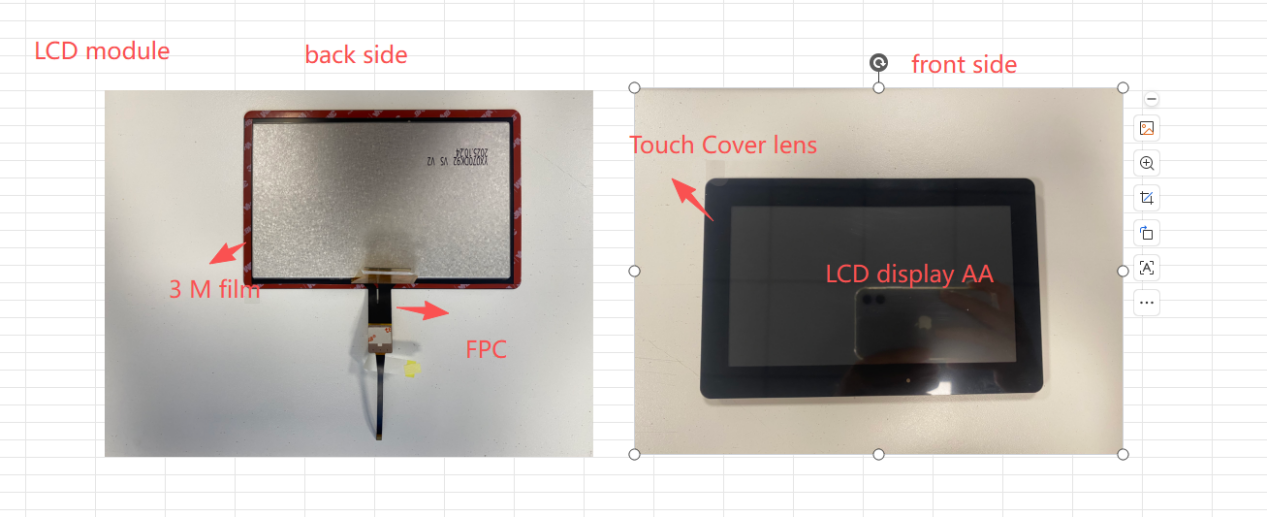
An LCD display module is a screen unit that includes the main parts needed to show images, text, and other information. Depending on its design, it may include an LCD panel, backlight, driver circuits, and flexible connection cables.
The LCD panel creates the image, the backlight makes it visible, and the driver IC controls what appears on the screen. Some modules also include touch or a separate driver board.
Common components include:
- LCD Panel: The main screen that shows images, text, and graphics.
- Backlight Unit: Provides light behind the screen.
- Driver IC: Controls the pixels and display signals.
- FPC (Flexible Printed Circuit): A thin, flexible cable connecting the display to other electronics.
- Backlight Circuit: Controls the LCD backlight.
Configurations vary: some modules are basic screen units, while others include extra parts.
Reference :
When Is an LCD Display Module Suitable?
An LCD display module is a practical choice if your company already has a mainboard and an engineering team.
For example, an industrial equipment manufacturer may have its own control system and only need a screen that matches it. The team can choose a display based on size, resolution, brightness, and interface.
This gives the manufacturer more design control, but it must connect, install, and test the display.
2. What Is a Complete Display Assembly?
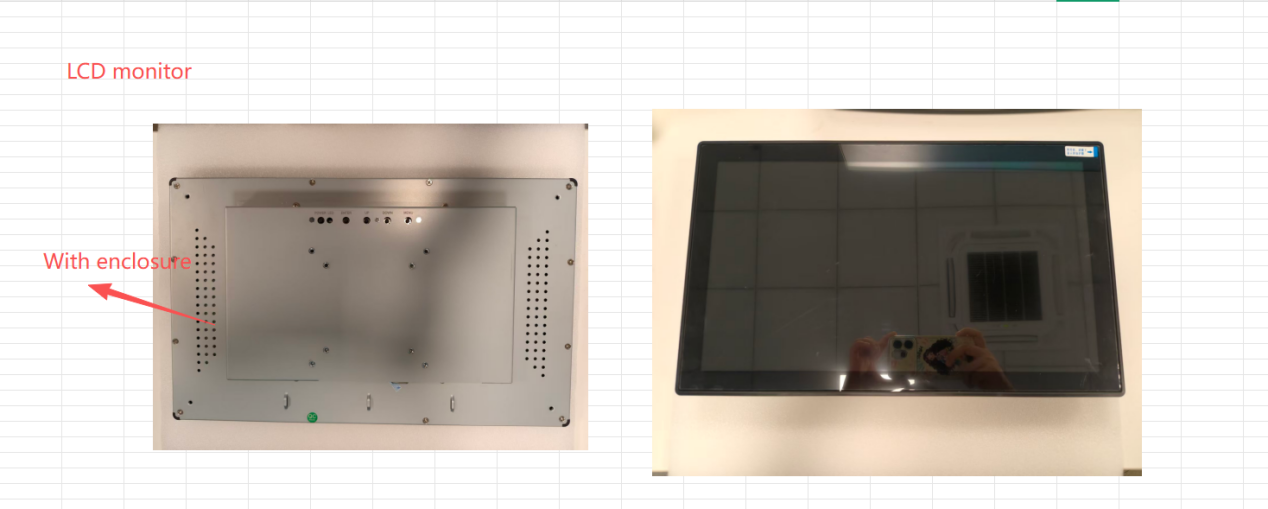
A complete display assembly brings several display-related parts together in one unit.
We call it “ LCD monitor “ .Instead of buying the screen, touch panel, driver board, and housing separately, manufacturers can source a combination designed for their product.
Depending on the project, a complete display assembly may include:
- LCD or OLED panel
- Capacitive or resistive touch panel
- Driver board
- Mainboard
- Housing or outer case
- Connecting cables and accessories
- Power supply components, when required
Not every project needs all these parts. The right combination depends on the product’s functions, internal design, and installation requirements.
Four Common Display Configurations
Option 1: LCD + Touch Panel + Driver Board
This setup combines the screen, touch function, and driver board. It suits products that already have a main control system but need a display unit that is easier to connect and install.
Option 2: LCD + Touch Panel + Driver Board + Housing
Adding a housing helps protect the display and makes installation easier. This option can suit industrial control panels, equipment interfaces, and products with specific mounting requirements.
Option 3: LCD + Touch Panel + Mainboard
Some products need a mainboard to manage functions beyond basic screen control. The board can be selected around the project’s needs. Buyers should confirm connections, processing requirements, and software compatibility during development.
Option 4: Complete Display Assembly with Accessories
A more integrated solution may include the LCD, touch panel, mainboard, housing, cables, and power-related accessories. This gives the manufacturer a more complete unit and reduces the number of separate parts it needs to source.
The goal is to make sure the selected parts work together and meet the product’s needs.
3. LCD Display Module vs. Complete Display Assembly: Main Differences
The main difference is how much integration work the buyer needs to do after receiving the display.
3.1 Integration Work
When buying an individual LCD display module, the manufacturer may need to connect it to the mainboard, design the mounting structure, and test it with the rest of the device.
With a complete display assembly, several of these parts are already supplied as a coordinated unit. This can reduce the work needed from the buyer’s engineering team.
3.2 Design Flexibility
An LCD display module works well for companies with an established hardware design. They may only need a screen with a specific size, resolution, interface, or brightness.
A complete display assembly is useful when the project also needs a customized touch panel, driver board, mainboard, housing, or cable arrangement.
3.3 Development Time
Separate components need to be checked to make sure they work together. The LCD panel, touch controller, driver board, and mainboard must have compatible connections. Their physical sizes and mounting positions must also match.
If a component changes, some testing may need to be repeated. A coordinated display assembly can reduce this work, but custom interfaces, housing, tooling, and testing still affect the schedule.
3.4 Purchasing and Supplier Management
Buying components from several suppliers can make communication more complicated. One supplier may provide the LCD panel, another the touch panel, and a third the driver board. If a problem occurs, the buyer may need to contact each supplier to find its cause.
A supplier offering several display components gives the buyer one contact for specifications, compatibility, and assembly.
3.5 Total Project Cost
The lowest screen price does not always mean the lowest total project cost. Manufacturers should also consider:
- Component prices
- Engineering and installation work
- Housing design and tooling
- Compatibility testing and quality checks
- Communication with different suppliers
- Possible rework after design changes
If a company has an experienced engineering team, buying an LCD display module may be more economical. If a project needs several customized parts, a complete display assembly may reduce extra work and supplier coordination.
Compare the total cost of the project, not just the price of the LCD panel.
4. Choosing a Display for Different Industries
Display requirements vary by application. Factory equipment, medical devices, and consumer products all have different needs.
Industrial Equipment
Industrial equipment may operate outdoors or in places with high or low temperatures. Important factors include operating temperature, brightness, viewing angle, touch operation, signal interface, and mounting design.
For outdoor equipment, a high-brightness LCD display may be needed so users can read the screen in strong light. If the machine already has a control system, an LCD display module may be enough. If it needs a dedicated front panel or enclosure, a complete display assembly may be more suitable.
Medical Equipment
Medical equipment often needs clear, stable displays. Depending on the application, manufacturers may consider resolution, color performance, brightness, touch operation, and long-term component supply.
Some devices only need an LCD module connected to an existing control system. Others may need a complete display unit with touch, control electronics, and customized housing. Requirements should be checked against the equipment’s purpose and relevant regulations. A display used in medical equipment is not automatically medically certified.
Automotive and Transportation Equipment
Displays in vehicles and transportation equipment may face vibration, changing temperatures, sunlight, and limited installation space.
Manufacturers should check the operating conditions, electrical connections, and mechanical design. An LCD display module may suit a product with an established electronic platform. A complete display assembly may be useful when a special enclosure, touch function, or cable layout is required.
Consumer Electronics and Smart Devices
Consumer products often need compact displays, attractive designs, and easy-to-use controls. A product may use a small LCD or OLED screen, a touch panel, or a customized display assembly that fits into a limited space.
For battery-powered devices, power consumption is another important factor. Companies with their own engineering teams may prefer individual components, while brands looking to simplify assembly may choose a more integrated solution.
5. What to Prepare Before Ordering a Custom LCD Display
Before contacting a supplier, prepare the basic details of your product. This makes it easier to identify a suitable solution.
1. Screen Size and Resolution
Confirm the screen size, active display area, resolution, and shape. This helps determine whether a standard panel will work or whether a custom LCD display is needed.
2. Display Technology
Decide whether your product needs LCD, OLED, monochrome display, or e-paper. Each technology has different features in power use, contrast, color, and suitable applications.
3. Touch Function
If users need to operate the product by touching the screen, specify whether capacitive or resistive touch is required. The choice depends on how the device will be used, the working environment, and whether users may wear gloves.
4. Interface and Driver Board
The display must connect to the product’s electronic system. Common interfaces include RGB, LVDS, and MIPI DSI. The driver board must be compatible with both the display panel and the host system.
5. Housing and Installation
Share the available space, mounting dimensions, housing requirements, and cable position. These details are especially important for a complete display assembly.
6. Working Environment
Explain where the product will be used. Does it need to work indoors or outdoors? Will it face high or low temperatures, strong light, moisture, or vibration? This information helps the supplier recommend suitable components.
7. Order Quantity and Product Lifecycle
Share the estimated order quantity and expected product lifecycle. A product made regularly over several years may need a different supply plan from a prototype or one-time project. Discussing future demand early can help both sides plan production and component supply.
6. Why Work with a Display Supplier That Offers Integration?
A display supplier can do more than provide an LCD panel. For many manufacturers, the challenge is making sure the screen, touch function, electronic boards, and housing work together.
A supplier with different display products and integration options can help customers choose a configuration that matches their project. One customer may need only an LCD panel and driver board. Another may need touch, a mainboard, housing, and connecting cables.
Sourcing these parts from one supplier can reduce the need to coordinate several component vendors. When choosing an LCD Display Module Supplier, buyers should also consider:
- Experience with display customization
- Clear technical communication and support
- Product quality and inspection processes
- Ability to support repeat orders
- Realistic development and production schedules
- Long-term component availability
A good supplier relationship needs clear requirements, consistent quality, and effective communication.
7. Which Option Should You Choose?
There is no single answer for every project.
An LCD display module is often a good choice when a company already has its own electronic and mechanical design. It gives the engineering team more control over the final product.
A complete display assembly may be more suitable when a project needs several customized parts and the manufacturer wants a simpler purchasing and integration process.
Before deciding, ask three questions:
- Does your company have the engineering resources to connect and install the display?
- Do you need only a screen, or also touch, driver boards, a mainboard, and housing?
- Would sourcing several display components from one supplier make development and purchasing easier?
The answers will help you choose the right display configuration.
Conclusion
Choosing between an LCD display module and a complete display assembly depends on your product design, technical needs, and purchasing plans.
If your company already has a complete electronic system, an individual display module may be enough. If your project needs touch, control boards, a customized housing, and other accessories, a more integrated solution may reduce development work and supplier coordination.
The best choice is not necessarily the one with the most components. It is the one that fits your product and makes development and production easier.
At SEBO, we have 13 years of experience in the display industry and provide customized solutions for LCD, OLED, monochrome displays, and e-paper. Our options range from LCD panels and touch solutions to driver boards, mainboards, housings, cables, and complete display assemblies.
Whether you are developing a new electronic device or improving an existing product, we can discuss your screen size, interface, touch requirements, and assembly needs to find a suitable display solution.
Looking for a display solution for your next project? Contact our team to discuss your requirements.