How to Choose the Right TFT LCD Display for Industrial Applications
By Grace | Shenzhen New Display Co., Ltd.
Displays are an important part of many industrial products. They allow operators to check machine status, read data, change settings, and view warning messages. In some equipment, the screen is also the main way users interact with the system. This makes choosing the right industrial TFT LCD display an important part of product development.
However, selecting a display is not simply a matter of finding a screen with the right size. Different applications have different requirements. An indoor control panel may only need standard brightness, while outdoor equipment may require a high-brightness display that remains readable in strong sunlight. Portable instruments may need compact screens, while factory equipment may require a wider operating temperature range and a stable supply of display modules.
Before choosing an LCD, it is important to understand the working environment, display requirements, and connection to the main control board. This article introduces several key points to help you select a suitable TFT LCD display for industrial applications.
1. Understand Where and How the Display Will Be Used
The first step is to understand the equipment and its working environment. An LCD used in an indoor control panel may have very different requirements from one installed in outdoor equipment, vehicles, or portable testing devices.
Start by considering a few basic questions:
1. Will the equipment be used indoors, outdoors, or in both environments?
2. Will users look at the screen from different angles?
3. Will the display be exposed to high or low temperatures?
4. Will users operate it with their fingers, gloves, or a stylus?
5. How many hours will the display work each day?
These details help determine which display features are important. For example, an indoor controller may mainly need clear text and simple operation. Outdoor equipment may need higher brightness and better control of screen reflections. A device used in a workshop may need to operate reliably across a wider temperature range.
You should also consider the expected service life of the finished product. Industrial equipment is often used for many years. If the LCD model becomes unavailable too soon, finding a suitable replacement may cause problems during maintenance or future production.
For long-term projects, ask the supplier about the display’s production status and expected availability. It is also useful to keep the datasheet and mechanical drawings for future reference.
2. Choose the Right Display Size and Resolution
Screen size affects both the equipment design and how easily users can read the information. Common sizes used in industrial applications include 3.5-inch, 5-inch, 7-inch, 8.4-inch, and 10.1-inch displays.
Smaller screens are often used in compact instruments and handheld devices. Larger screens provide more space for menus, charts, operating data, and touch controls.
However, a bigger screen is not always the better choice. You should consider the available space inside the equipment, the distance from which users will view the screen, and how much information needs to be displayed. A small controller may only need a few buttons and status icons, while a machine control panel may need a larger screen to show several values at the same time.
Resolution is another important factor. It refers to the number of pixels that make up the image. A higher resolution can show more details, but it should also match the content and the processing capability of the main control board.
For a simple interface, a very high resolution may not be necessary. If the screen needs to show detailed graphics, charts, or a large amount of information, a higher resolution may be more suitable.
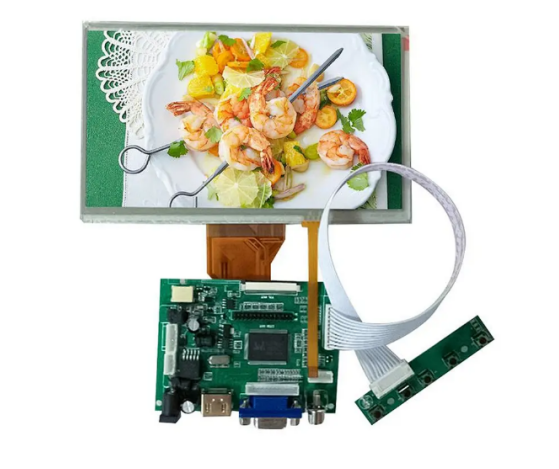
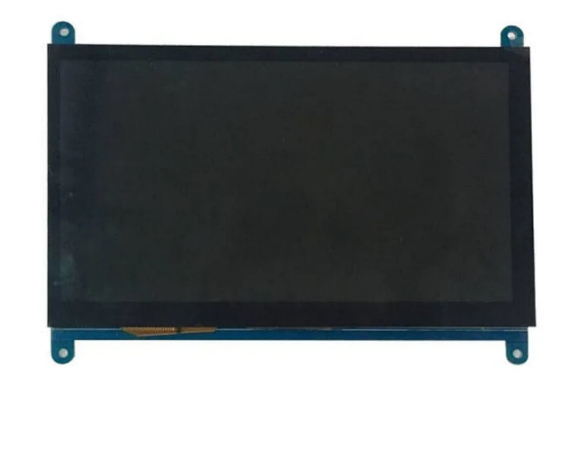
For example, 7-inch TFT LCD displays are available with resolutions such as 800 × 480 and 1024 × 600. The right choice depends on the user interface, viewing distance, and control board. It is better to consider screen size and resolution together rather than choosing either one separately.
For an industrial project, you may consider our 7-inch 1024 × 600 IPS LCD with capacitive touch. If a larger screen is needed, our 8.4-inch AUO TFTLCD, with an 800 × 600 resolution, is another option. These examples show how different display sizes and specifications can meet different project requirements.
7inch 800*480(left) and 1024*600(right)
3. Check Brightness and Viewing Angle
Brightness is one of the main specifications to check when choosing an LCD. It is usually measured in nits or cd/m². The required brightness mainly depends on the lighting conditions around the screen.
For equipment used indoors, a standard-brightness display may be enough. If the screen is near a bright window or used in a semi-outdoor area, a brighter backlight may be needed. For equipment used in direct sunlight, display visibility needs even more attention.
However, higher brightness does not solve every visibility problem. Reflections from the screen surface can still make information difficult to read, even when the backlight is bright.
There are several ways to improve screen visibility. Anti-glare (AG) treatment helps reduce glare from the screen surface. Anti-reflective (AR) treatment helps reduce reflected light. Optical bonding is another option. It uses transparent adhesive to join the display and cover glass, reducing the air gap between them and helping to reduce internal reflections.
The final result depends on the complete display structure. The LCD panel, touch panel, adhesive, and cover glass should all be considered together. Simply increasing the backlight brightness may not be the most effective solution for every project.
Viewing angle is also worth checking. If users need to read the screen from different positions, a display with a wide viewing angle may be a better choice. IPS technology is often used when the screen needs to keep its image and colours more consistent when viewed from the side.
If your project will be used in a bright environment, you can also check our sunlight-readable LCD displays and compare the available options with your brightness and optical requirements.
4. Make Sure the Display Interface Matches Your System
An LCD module needs to work with the main control board. Before choosing a model, check which display interface your system supports.
Common LCD panel interfaces include RGB, LVDS, MIPI DSI, and eDP. They use different signal methods and are not automatically compatible with each other. The control board, display timing, connector, pin definition, and cable design all need to match.
Here is a basic comparison of some common interfaces:
| Interface | General characteristics | Common use or consideration |
| RGB | Transfers pixel data through parallel signal lines | Often used in simpler display systems; check signal timing and data width |
| LVDS | Uses differential signals for data transmission | Common in industrial and larger TFT LCD modules; check channel configuration and pin assignment |
| MIPI DSI | Uses high-speed serial communication | Often used in compact devices; check lane configuration and driver support |
| eDP | A high-speed digital display interface | Used in various high-resolution display systems; check version, bandwidth, and connector |
This table is a general introduction. The actual interface specifications must always be confirmed from the datasheet of the selected LCD module.
Do not check only the interface name. Even two LCD modules with an LVDS interface may have different pin assignments or timing requirements. The connector position and cable direction can also affect the design. If a driver board or converter board is needed, its input and output interfaces should be checked as well.
It is also important to understand the difference between an LCD panel interface and a driver board input interface. For example, HDMI is commonly used as an input to a driver board. The board then converts the signal into the format required by the LCD panel. Therefore, HDMI should not be treated as the same type of panel interface as LVDS or MIPI DSI.
To make the selection easier, share the existing display model, control board information, datasheet, or interface requirements with your display supplier. If you are replacing an old screen, compare its mechanical drawing and electrical specifications with the new model. Two displays may have the same diagonal size but still may not be direct replacements.
Whenever possible, test the LCD with the actual control board before mass production. This helps identify possible problems with image display, cable connections, and system start-up before moving to the next stage.
5. Decide Whether Your Project Needs a Touch Panel
Not every industrial device needs a touchscreen. Some products only need to show information, while others require users to enter data, select options, or control the equipment directly through the screen.
If users need to interact with the display, a touch panel may be a good option. Resistive and capacitive touch panels are two common choices. They work in different ways and are suitable for different applications.
| Feature | Resistive touch panel | Capacitive touch panel |
| How it works | Responds to pressure applied to the screen | etects changes in an electrical field |
| Input method | Finger, stylus, or other suitable pressure tools | Usually finger touch |
| Multi-touch | Generally limited | Commonly supports multi-touch |
| Glove operation | Depends on the design and pressure input | Depends on the touch controller and glove type |
| Main consideration | Suitable for pressure-based input | Suitable for modern touch interfaces and multi-touch operation |
The best choice depends on how the equipment will be used. For example, a device operated with a stylus may have different requirements from a control panel operated by finger. If users need to wear gloves, this should be discussed and tested before choosing the touch panel. Not every capacitive touch panel works with every type of glove.
You should also consider the structure of the complete display. Some projects use an LCD panel together with a touch panel and protective cover glass. These parts can be joined by air bonding or optical bonding.
Optical bonding uses transparent adhesive to connect the layers and reduce the air gap. This can help reduce internal reflections and improve screen visibility. However, the bonding method should be selected based on the display design, mechanical requirements, and project budget.
If your project needs an integrated display solution, you can check our LCD, driver board, and touch panel products. The right combination can help bring the display, touch function, and driving components together.
6. Check the Operating Temperature and Reliability
Industrial equipment may be used in places with bigger temperature changes than those found in normal offices or homes. Because of this, the LCD’s operating temperature range should match the environment where the finished product will work.
Check the minimum and maximum operating temperatures in the product datasheet. You should also think about where the screen will be installed. For example, an LCD inside a closed enclosure may become warmer because of heat from other electronic parts. A high-brightness backlight can also produce extra heat.
Other conditions are worth considering, such as vibration, dust, moisture, and long working hours. The reliability of a display does not depend only on the LCD module itself. Its mounting structure, enclosure, cable connection, heat management, and testing are also important.
For products that will be made and used for many years, ask the supplier about the panel’s production status and lifecycle. Keep important documents such as the datasheet, mechanical drawing, interface details, and sample test records.
If the original model is no longer available in the future, these documents can help the engineering team find and check a suitable replacement.
7. Consider Customization and Integration Needs
Standard LCD modules can meet the needs of many projects. However, some products require changes to the display to fit their design.
Customization may include the FPC shape or position, connector, backlight brightness, touch panel, cover glass, or driver board. These changes help the display fit the product’s structure and electronic system.
For example, a device may have limited space behind the front panel, so the FPC position or cable direction needs to be adjusted. Another project may need a certain brightness level or a touch panel with a specific interface. Some systems may also need an HDMI driver board or a converter board to connect the LCD to the main control system.
It is better to discuss these requirements with the supplier at an early stage. You can prepare the display size, resolution, brightness, interface, operating temperature, available space, and required functions. Drawings, product photos, or the model number of the existing display can also help the supplier understand your needs.
Sample testing is another important step. Before confirming mass production, test the display in the actual equipment or a similar test setup. Check the image quality, touch function, viewing angle, cable connection, and performance under the expected working conditions.
8. Choose a Supplier and Test the Complete Solution
Choosing an industrial TFT LCD display involves more than comparing a few numbers on a datasheet. The display needs to match the optical, electrical, and mechanical requirements of the finished product. It should also meet the project’s production plan and expected service life.
When contacting a display supplier, it is helpful to prepare some basic information. This includes the application, screen size, resolution, brightness, interface, touch requirements, operating temperature, and mechanical dimensions.
If you are looking for a replacement display, provide the existing model number and datasheet if possible. If you have not selected a specific model yet, explain what the equipment does and where it will be used.
A supplier can help compare available models, check interface compatibility, and discuss whether a touch panel, cover glass, optical bonding, or driver board is needed. However, the final choice should be based on technical documents and sample testing, rather than only a product photo or a general recommendation.
For industrial projects, the best display is not always the one with the highest brightness or resolution. It is the one that works well in the actual equipment and meets the project’s needs.
Preparing a clear list of requirements and testing the display early can help reduce design changes and make the development process easier.
Conclusion
Choosing the right industrial TFT LCD display starts with understanding the application. Screen size and resolution affect how information is shown. Brightness and viewing angle affect how easy the screen is to read. Interface compatibility determines whether the LCD can work with the control system. Touch options, operating temperature, mechanical design, and product lifecycle are also important.
There is no single display that is suitable for every industrial project. By checking the working environment, comparing the key specifications, and testing the complete display solution before production, you can make a better choice and avoid problems during product development.